Medi-Cal Peer Support Specialist Certification

CalMHSA uses email to communicate about the certification process. For this reason, it’s important to make sure your record is up to date.

Follow the steps below to make changes to your email address on your application for certification and prior to receiving your approval for scheduling the certification exam.

Important!! Your email address on file at the time of exam approval is used when scheduling or rescheduling your exam. Therefore, it must match the records on file to avoid delays in scheduling. If you need to change your email address after exam approval, please email peercertification@calmhsa.org to request the change.
1. Locate Our Website

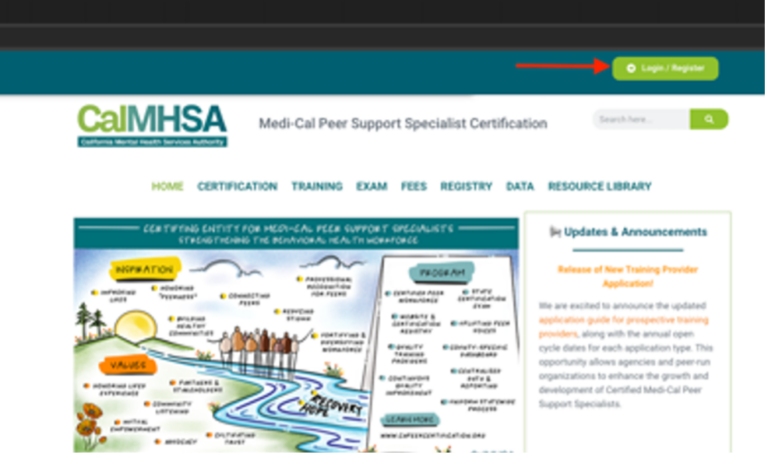
Select the Register/Login button from our website at www.capeercertification.org 

Peer Program website with arrow pointing to Login/Register button
2. Log In

A login box will appear. Log in using one of the following methods: 

  • Select “Sign in with Google” or “Sign in with Microsoft.” 
  • Manually enter your email and password.

Note: Be sure to log in with the same email and method you used when initially filling out your application to avoid errors.

If you need to reset your password, see How to: Reset Your Password instructions. 

CalMHSA dashboard sign in box says: Sign in with Google, Microsoft or enter your email, password and Log In. Below text reads "don't remember your password?" and "can't access your email anymore?".
3. Navigate to Your Profile

On the top right of the Dashboard, hover over your initials and select Profile. 

profile and logout buttons on candidate dashboard.
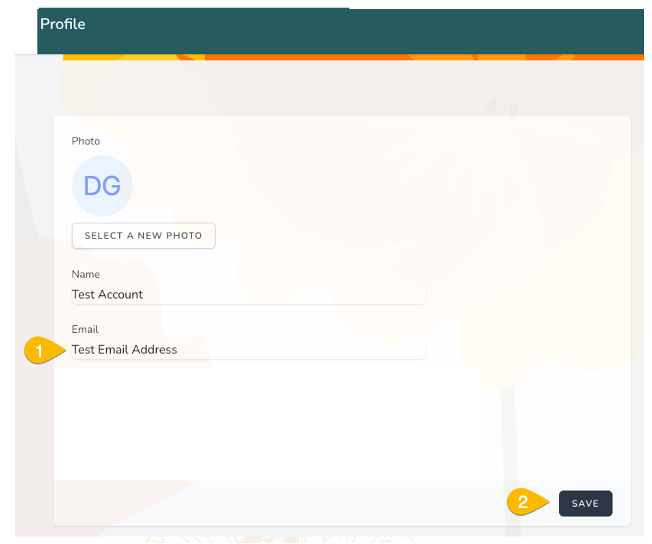
4. Enter New Email Address

On the Profile screen:

  • Enter your new email address under Email
  • Select SAVE
  • Do not log out until you receive verification email
candidate profile screen. Shows profile photo, "select a new photo", Name, Email, and "save".
5. Verify Your New Email Address
  • In a different browser tab, check your email address for the verification email.
  • Click the link in the email to verify.
  • Once you verify your email, you will receive another email to create a new password, or you can log in with your previous password.
  • Log out of the portal and log back in with your new email and current password.
verification email for Medi-Cal Peer Support Specialist Certification

For additional support, please email peercertification@calmhsa.org