The procedure outlines the process for approved Training Providers who are requesting a significant modification to their approved curriculum.
For individuals who request minor edits or corrections to their materials; they may submit a request directly to PeerCertification@CalMHSA.org.
Step-by-Step Instructions
1. Applicant must log into their training provider online application.
Select the Register/Login button from our website at www.capeercertification.org
A login box will appear. Login by selecting either the “Sign in with Google” or “Sign in with Microsoft,” or manually type in your email and password.
Note: You must log in the same way and with the same email/password as when you filled out your application.
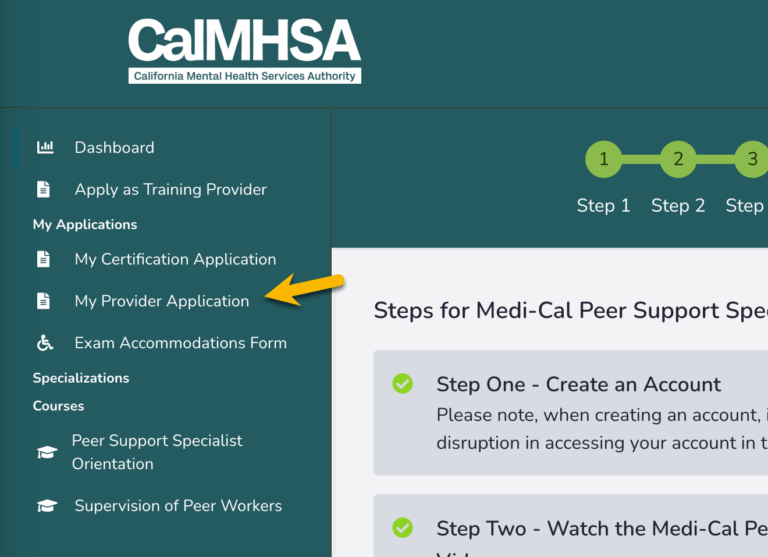
Once at the Dashboard, you will find your application on the left sidebar under “My Applications.” Click “My Provider Application.” This will open your application.
2. Select “REVISE” to proceed with payment.
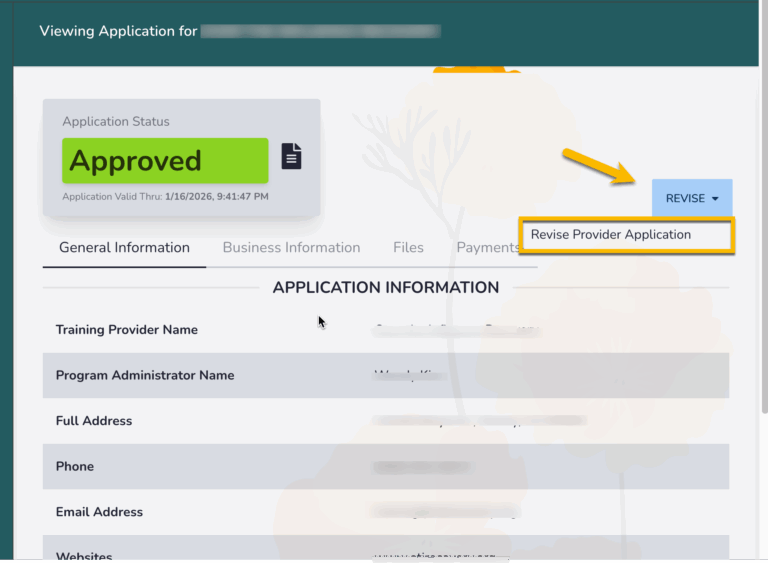
Upon viewing your application, you will see a blue box labeled “Revise.” Select the blue “Revise” button. From there, a white box will drop down reading “Revise Provider Application”. Click the button to proceed.
3. Provide the payment for the modification request fee by selecting “PAY”.
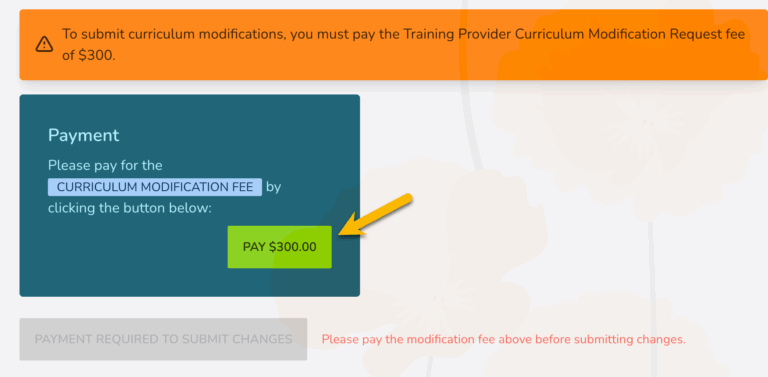
Scroll to the very bottom of the application. You will see a blue box that reads “Payment”. Select the green “PAY $300” button to proceed with payment details.
Notification of Modifications:
The Peer Certification team will be notified once the payment is received. From there, our team will email you a link to dropbox to upload your curriculum modification(s).